

You tap a bet button, the countdown disappears, and the amount seems to have left your balance. Did you enter that round? The useful answer is in the entry record, not in how quickly the rocket moved. A request, an accepted bet and a settled result are separate events. This guide uses published supplier documentation and fictional records to explain the difference; the linked Android app has not been tested for these exact status labels.
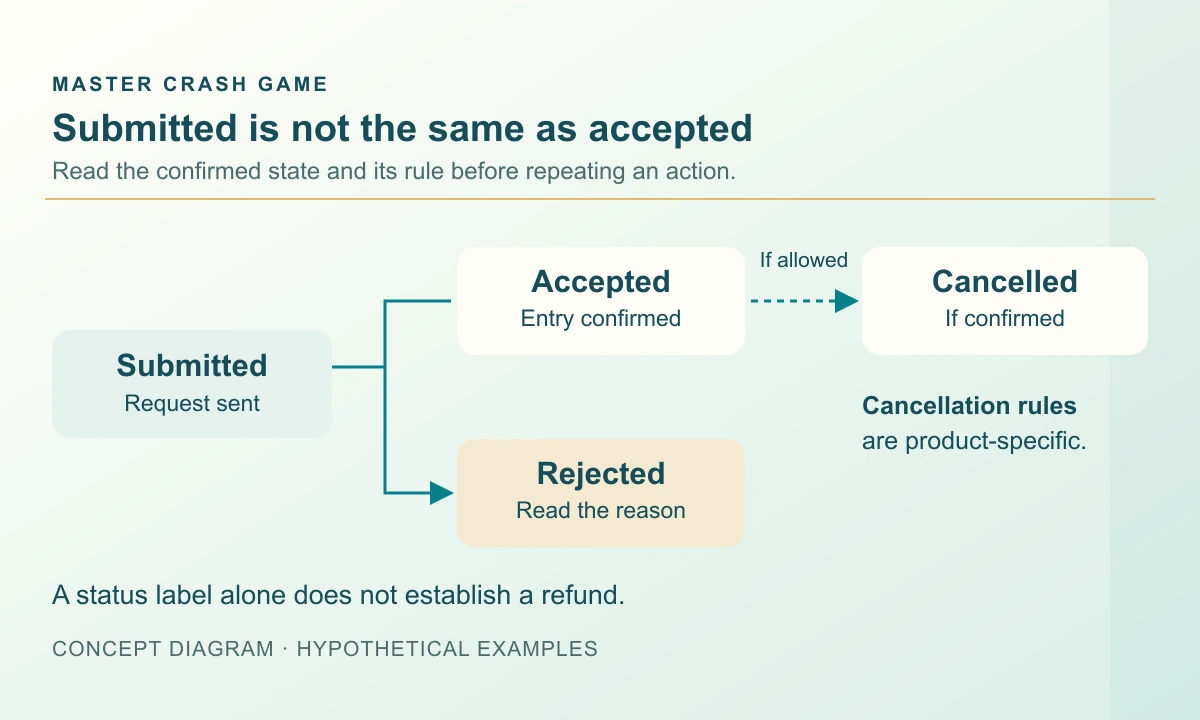
Read the entry state before the flight
Start with the round identifier and the entry identifier, where one is available. The round identifies the shared event. The entry identifies your participation in it. A typed amount is only an amount in a form, and a button tap records an intention until the system acknowledges the request. If the interface displays a pending message, retain that wording rather than translating it into a successful bet.
BGaming’s published Space XY rules describe server validation before the flight animation begins. That is a helpful example of an acceptance step. It does not make another game’s button, colour or animation a reliable substitute for its own confirmation. On a small screen, expand the individual entry details instead of relying on a balance number that may be updating.
Keep rejection, loss and cancellation apart
The operator-hosted Spaceman Game Help v1.7 distinguishes accepted and rejected entries. It names late submission, limits and transaction issues among possible rejection causes. A rejection concerns admission to the round; a loss concerns the outcome of an accepted entry. Treating both as a losing round makes an account review harder to follow.
Cancellation is another state again. The same help describes technical cancellation separately from an ordinary ending and gives a refund policy for that configuration. Read the applicable help before expecting the same treatment elsewhere. In your own notes, keep an original debit, any settlement and any reversing credit as separate lines. A cancelled record alone does not tell you when a separate credit appeared.
Swipe sideways to read the full table →
| Recorded state | Question to resolve | Useful evidence |
|---|---|---|
| Pending | Has this request been accepted? | Request time and entry identifier |
| Accepted | Which round contains this entry? | Round and committed amount |
| Rejected | Why was participation declined? | Reason code and transaction record |
| Cancelled | What reversal does the rule require? | Cancellation and credit records |
| Settled | What was the final entry result? | Status, gross return and currency |
Reconcile a fictional cancelled entry
Imagine a starting balance of 80 units. One accepted entry commits 6 units, leaving 74 available. The game later marks that entry cancelled and records a 6-unit reversing credit. If there were no other transactions, the reconciled balance returns to 80. The refund restores the committed amount; it is not a 6-unit profit.
Now change only the evidence: suppose the record says cancelled but the 6-unit credit is still absent. The arithmetic identifies an unresolved difference, not its cause or a guaranteed processing time. Preserve the cancellation reference and ask which ledger item supplies the reversal. Do not invent a cash-out multiplier to explain a refund, and do not combine this example with unrelated bonus or withdrawal balances.
Check for an existing entry before trying again
An unanswered tap can tempt you to tap twice. If the first request was accepted but the display was delayed, a second request could become another entry where the product permits it. Look for an acknowledgement and inspect the relevant history before retrying. A disappearing spinner is not enough evidence to decide whether the original request failed.
Also check which round a retry would enter. A control visible during a flight may refer to a later round. If the product has several panels, identify the panel too: matching amounts can conceal two different entries. An ordinary refresh can restore a display, but it should not be treated as a command that cancels, refunds or changes an already accepted entry.
Send a record that support can follow
A useful report connects the time, timezone, product version, round, entry, amount, currency and exact status. Add a screenshot with those labels visible and list the corresponding debit or credit references. If the balance contains other activity, identify the small interval being disputed rather than subtracting an entire day’s closing balance from its opening balance.
Describe what you observed without guessing the fix: “Entry A shows cancelled; I cannot find its reversing credit” is clearer than “the game owes a winning payout.” Redact login details, payment codes and other people’s information. Keep the original evidence privately; a public social comment is unsuitable for posting a full account record. The operator handling the account must resolve its private transaction history.
Frequently asked questions
Does a pending Crash bet mean it was accepted?
No. Pending leaves acceptance unresolved. Check the acknowledgement and entry record before assuming participation or submitting again.
Is a rejected bet the same as a lost bet?
No. Rejection concerns whether the entry was admitted. A loss is a result recorded for an accepted entry.
Is a refunded stake profit?
No. In the fictional 6-unit example, the reversing credit restores the original amount and leaves net profit at zero.
Sources and scope
Examples use the rules and fictional units stated in the article. Check the actual product for its available modes, rules and conditions; no outcome or payment is promised.
Adults 18+. Set time and spending boundaries before participation. Read the limits and breaks guide.
For an installation question
Keep the round reference for your status query; use the Master Crash download page for file details and Android installation guidance.
Open Master Crash download detailsRelated reading
Crash Chart Explained: Axes, Round States and Results
Learn what a Crash game graph shows, how round states change and why a visible multiplier is not a settlement record.
Read the guide Yuvan Kurup
Crash Profit Calculation: Stake vs Return
Calculate a Crash net result from stake, gross return and fees. Work through single-round and mixed-session examples without counting an entry twice.
Read the guide Mithila Kamat
Crash Auto Cash Out: What If You Disconnect?
Understand Crash auto cash-out targets and connection loss. Check which action the service accepted and how the final settlement is recorded.
Read the guideYuvan Kurup