


The large multiplier is usually the first thing you notice on a Crash screen. The small labels matter just as much: time, entry status and the final cash-out can refer to different stages of the same round. Read them together before interpreting the rising line. The illustrations here explain those labels; they are not screenshots of the downloaded app.
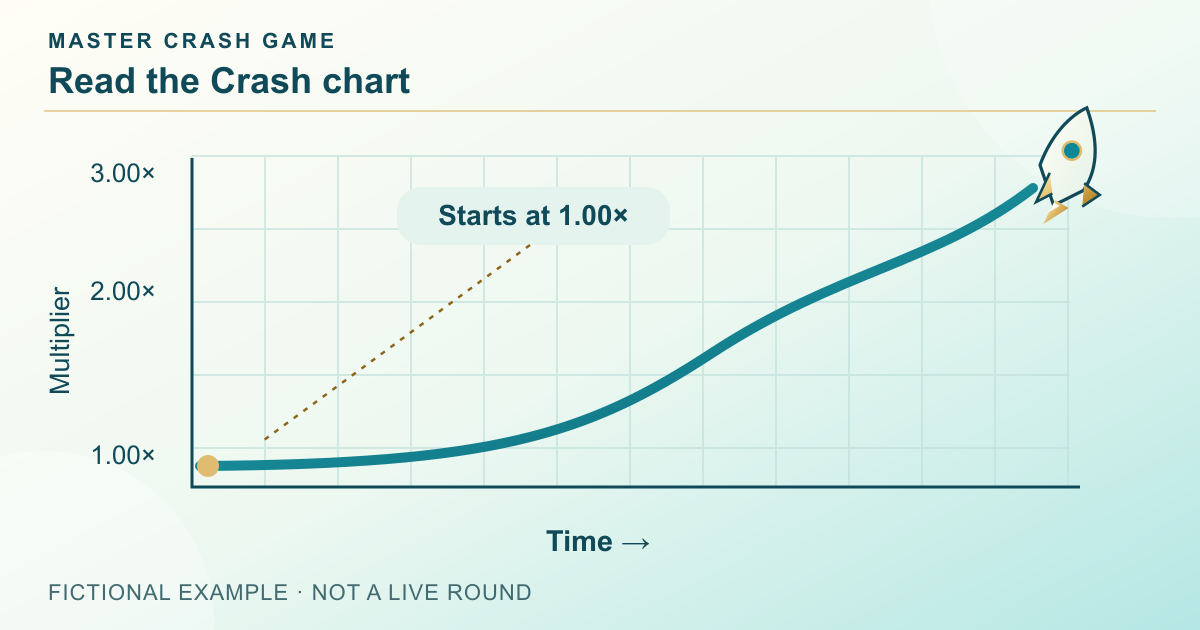
Read both axes before reading the curve
BGaming describes Space XY with flight time on the horizontal axis and a possible winning multiplier on the vertical axis. That is a useful example of a labelled Crash chart, not a rule that every product must use the same layout. Some screens emphasise one large multiplier and leave the time scale unmarked. Identify the actual labels before estimating any value.
A multiplier such as 2.00× is a ratio, not two seconds or two currency units. A horizontal position describes progress along the displayed timeline. If either scale changes while the animation continues, the apparent steepness can change too. Do not read a new screen by copying the visual proportions of an earlier one.
Separate preparation, active play and the completed round
During preparation, the important question is whether an entry is accepted for the coming round. During the active stage, the screen can show the current multiplier and available actions. After the round ends, the important fields become the final outcome and any settled entry. A countdown, live value and history value therefore describe different stages rather than three competing answers.
Button wording can change with the stage: an entry control may become a cash-out control, be disabled or refer to a later round. Check the round identifier and accepted state beside it. A button being visible does not alone prove that an entry belongs to the currently animated round.
Swipe sideways to read the full table →
| Stage | Read first | Do not infer |
|---|---|---|
| Preparation | Round ID and accepted entry | A typed amount is already committed |
| Active | Current multiplier and action state | A tap has already settled |
| Completed | Accepted result and credited amount | The final peak was your own cash-out |
Keep the live multiplier separate from your accepted result
Suppose a fictional round ends at 2.40×, but an 8-unit entry has a confirmed cash-out of 1.75×. With a simple stake-times-multiplier rule, the gross return is 14 units: 8 units of stake plus a 6-unit gain before separate fees. The round’s 2.40× endpoint is a different field and must not be used to calculate this entry’s return.
This distinction also matters when a request is pending or the connection interrupts the display. The animation shows what the screen rendered; the accepted record shows what the product recorded. Preserve both labels if they disagree and consult the specific request-handling rules. The example does not specify how quickly the linked app handles requests.

Treat the curve as a display, not a forecast
A line that becomes steeper does not provide a countdown to its endpoint. A collection of completed curves describes a collection of completed rounds. Neither observation supplies the probability model, hidden inputs or next outcome. A highlighted high value can also draw attention away from the many shorter rounds around it.
Read any percentage, colour band or trend label with its definition. Is it a historical grouping, an animation cue or a documented probability? If the screen does not say, record the uncertainty instead of turning the colour into an entry signal. Our guide illustrations deliberately use labelled fictional values so that explanation is not mistaken for a live result.
Use a five-field screen-reading check
First identify the product and version, then the round, current state, relevant amount and final accepted result. When asking support about a result, add the timestamp and device details without exposing passwords or payment codes. This is more useful than sending a cropped curve with none of its labels.
Learn the controls through documented help or a clearly non-cash demonstration where available. On a phone, check whether history and entry details move below the chart. The reading order stays the same even when the layout changes. Actual Crash modes and controls inside the linked Android package still require product verification.
Frequently asked questions
Does a steeper Crash curve mean the round will end soon?
No such timing rule follows from its shape. Read the documented model rather than treating an animation as a forecast.
Is the final Crash multiplier my cash-out multiplier?
Only if the accepted entry record says so. The round ending value and a settled cash-out can be different values.
Are these diagrams screenshots of the Android game?
No. They are original teaching illustrations. The installed product’s actual interface and available modes remain to be checked.
Sources and scope
Examples use the rules and fictional units stated in the article. Check the actual product for its available modes, rules and conditions; no outcome or payment is promised.
Adults 18+. Set time and spending boundaries before participation. Read the limits and breaks guide.
Preparing your Android device
Once you have read the chart, the Master Crash download page can help with Android requirements, file checks and installation.
See the Master Crash Android downloadRelated reading
Crash Cash Out: From Entry to Settlement
Follow a Crash cash-out request through entry, the live multiplier and settlement. Compare the displayed action with the accepted final record.
Read the guide Ishani Bendre
Crash Game History: What Do Past Rounds Show?
Read Crash game history by round ID, multiplier and settlement. See why earlier outcomes do not establish the next result or validate a prediction.
Read the guide Neeladri Basu
Crash Profit Calculation: Stake vs Return
Calculate a Crash net result from stake, gross return and fees. Work through single-round and mixed-session examples without counting an entry twice.
Read the guide Mithila Kamat